Freesbe

For operations and IT

Alerts you can act on, and the routine on autopilot.

Freesbe gives operations and IT teams Zabbix problems as cards that turn green when resolved, with Acknowledge and Close buttons that act in Zabbix; workflows for help requests, incidents and approvals; Slack-compatible incoming webhooks; signed outgoing webhooks; apps built from Slack manifests; and a REST API for anything a person can do.

#ops-alerts with Zabbix problems: a website down, a full disk Tom acknowledged, and a gateway that recovered

Zabbix problems you handle from the card

Connect Zabbix 6.0 or later and each problem posts to the channel you pick, with its severity, host, value and tags. The same card stays current: when someone acknowledges or comments in Zabbix the card says who and what, and when the problem is resolved it turns green and says how long it lasted. Give Freesbe an API token and Acknowledge and Close problem on the card act in Zabbix, recorded under your name.

  • Pick which severities to post, per channel
  • Zabbix sends to Freesbe, so a server that can't be reached from the internet still works
  • Anything else with a webhook posts in Slack's or Teams' format
A low stock card from a webhook in #engineering, with Reorder and Open inventory buttons

Help requests and incidents as workflows

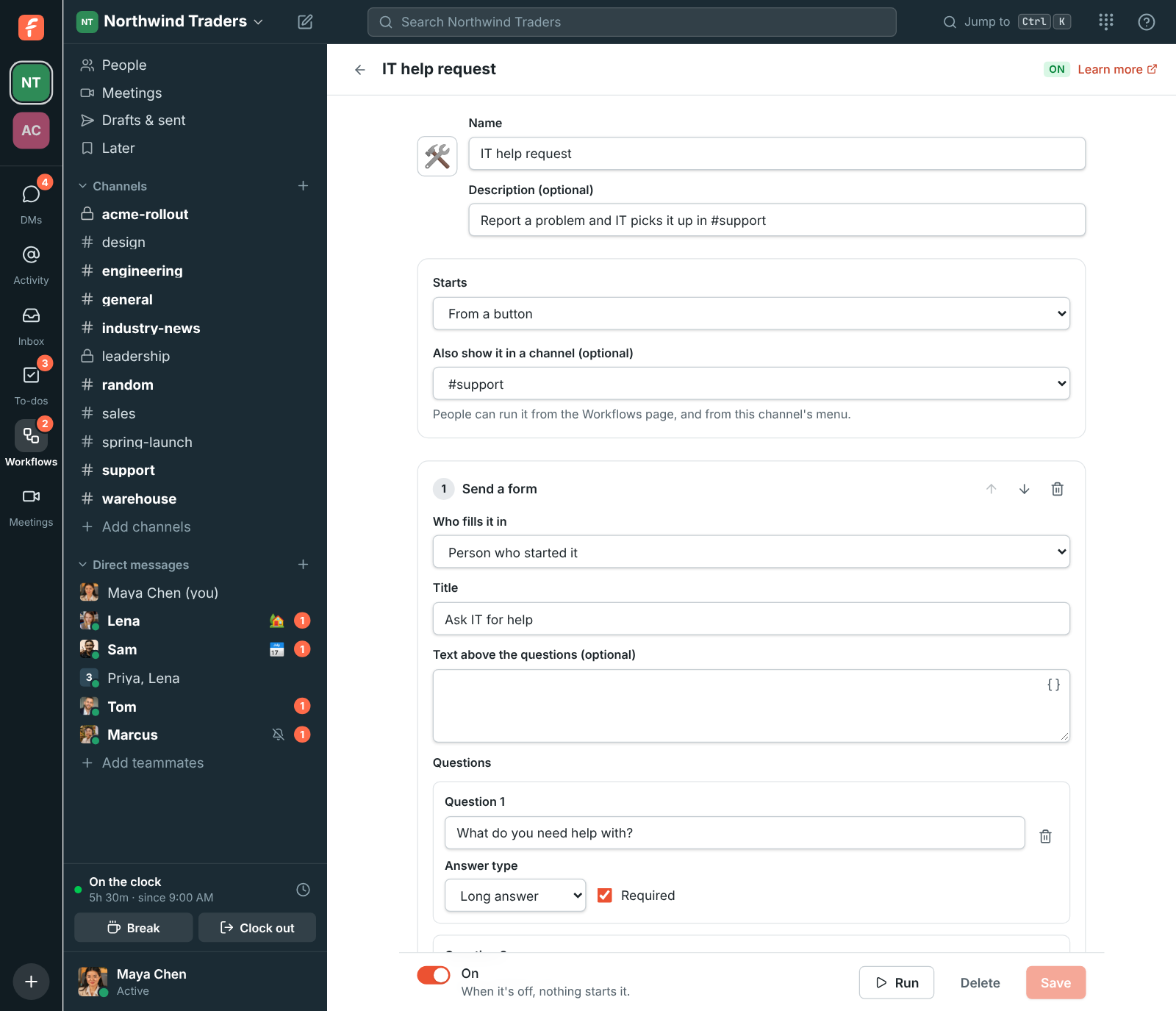
Start from the IT help request template: a form for the problem, posted to the channel where IT can pick it up, with a to-do for whoever takes it. The Incident kickoff template collects the basics and alerts the channel. Workflows start from a button, a schedule, a reaction, a keyword in a message or a webhook from another tool, and every run is listed step by step.

The workflow builder: a form step, then a message to #support, then a to-do

See it on your own team's data.

Start free with up to 10 people and try it today, or book a 20-minute demo with the people who make Freesbe.

Webhooks in, webhooks out

An incoming webhook posts into one channel and reads the same JSON as Slack's, so a tool set up for Slack only needs the new URL, and the same URL takes the cards tools send to Microsoft Teams. An outgoing webhook sends a signed POST to your server for 30 kinds of events, with retries and a delivery log.

Workspace settings, Webhooks: an incoming webhook that posts to #engineering

Apps from Slack manifests, and an API for the rest

Paste a Slack app manifest and Freesbe reads its scopes, events, slash commands and message shortcuts. The bot posts as itself with Block Kit cards, buttons and dialogs, and its token keeps working when the workspace requires single sign-on or MFA. The REST API covers messages, channels, people, meetings, the punch clock and workspace settings.

Workspace settings, Apps: Order desk and Stand-up, each with its scopes and token

Sign in with Freesbe for your own tools

Let the team sign in to an internal dashboard, a wiki or an admin tool with their Freesbe account, over standard OpenID Connect. Your workspace's rules apply there too: single sign-on, a second step and phone approval. When someone leaves, they can't sign in to those tools any more.

Questions

Which monitoring tools connect?
Zabbix has its own integration with cards and buttons. Grafana, Prometheus Alertmanager, PagerDuty, Datadog and others are coming to the same category; until then most of them post to a Slack-compatible incoming webhook.
Will our Slack integrations work?
Incoming webhooks accept Slack's JSON, including blocks and attachments, so they move with a new URL. Apps built for Slack come over by pasting their manifest, and they get events in Slack's envelope and signatures Slack's SDKs check.
Can a script do what an admin does?
Yes. A script signed in as an admin account can invite people, change roles, deactivate people, change workspace settings and manage webhooks through the API. An app's bot token is limited to its scopes.
What does a workflow run look like afterwards?
The builder lists the last 50 runs. Click one to see each step: what it sent, who filled in a form, and where it stopped and why. A workflow can start at most 200 runs an hour.

See it with your own team's questions.

Start a workspace free for up to 10 people, or book a 20-minute call and bring the questions your team would ask.