Freesbe

AI built in

AI that does the catching up, the writing up and the translating.

Freesbe's AI is on every plan, including Free. It summarizes a channel or a thread since you last read it, translates any message in place, tidies a reply before you send it, writes up recorded calls with decisions and action items, and answers a question with a link on every sentence. It reads only what you can read.

#spring-launch with its channel summary open: the launch is on track, with points linked to the messages behind them

Summaries with the message behind every point

Summarize a channel since you last read it, for the last day or the last week, or a thread with every reply. The summary starts with where things stand, then the main points, each with an arrow to the message it came from. Repeated alerts are read once, and asking again reads only what's new.

A thread in #spring-launch with its summary: the launch date is settled on April 14

Translate and write better, in place

Translate shows a message in your language right under the original, with names, mentions and links left alone. Improve writing fixes spelling and grammar, or makes your draft clearer, shorter, friendlier or more formal; you see the suggestion first and keep yours if you prefer. Nothing is sent until you send it.

An order written in German with its English translation under it

See it on your own team's data.

Start free with up to 10 people and try it today, or book a 20-minute demo with the people who make Freesbe.

Notes from every call

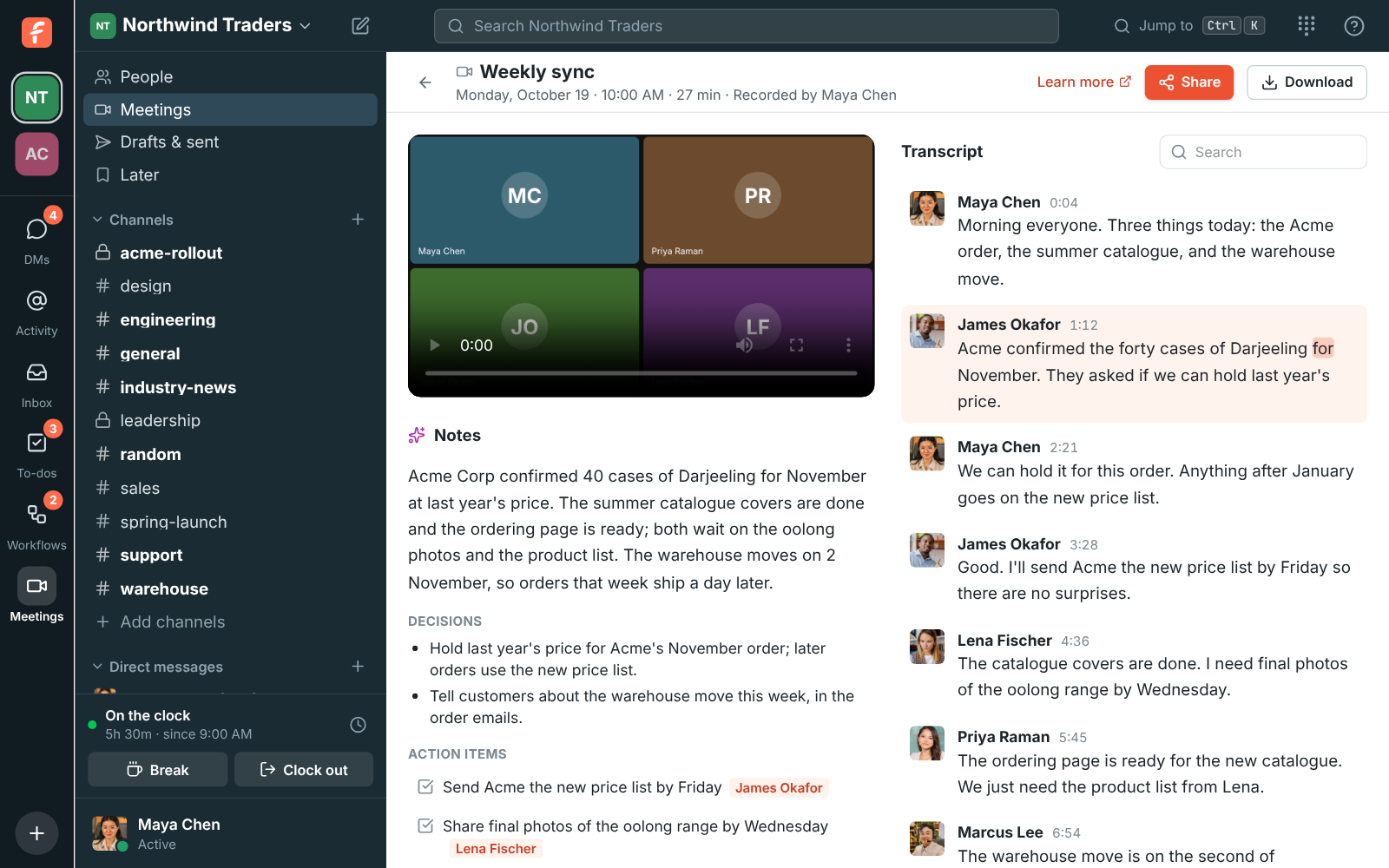
Record or transcribe a huddle or meeting and a minute or two later you get a transcript of who said what and notes with a summary, the decisions and the action items with owners, in the language of the call. Click a line to play from there, add an action item to your to-dos, and let meeting guests get the notes by email.

A recorded weekly sync with AI notes, decisions and action items next to a transcript

Ask Freesbe, and get sources

Type a question into the search box, like What did Priya say about pricing?, and Ask Freesbe answers from the messages you can see with a numbered link after each sentence. When the messages don't answer the question, it says so instead of guessing. Plan a to-do into steps with a due date, or have your profile photo's light fixed.

A to-do planned by AI: four numbered steps and a Set due button

Rules that hold on every plan

AI reads only what you can already read: never other people's DMs or private channels you're not in. Only you see summaries, translations and suggestions, and nothing is posted. Instructions inside messages are ignored. Your workspace isn't used to train models. Admins can turn AI off for the whole workspace and see how many requests are left.

  • Every plan has a monthly allowance, from 30 requests on Free
  • Transcripts and notes from calls on every plan too
  • Guests can't use AI features

Questions

Is AI included on the Free plan?
Yes: 30 AI requests a month for the workspace and 3 transcripts with notes. Paid plans include more per person, pooled across the workspace. The pricing page lists each plan's allowance.
Can the AI see private channels?
Only the ones you're in, and only when you ask about them. It never reads other people's DMs or channels you can't open. A kept summary is only shown to people who can read the same conversation.
Who sees that I used it?
Nobody. Summaries, translations and suggested rewrites appear on your screen and nothing is posted to the conversation.
Can admins turn it off?
Yes. One switch in workspace settings turns summaries, translations and writing help off for everyone, and another turns transcripts and notes off. Admins also choose who can start and stop recordings.

Try all of it free with up to 10 people.

No card, no time limit. Invite your team and see what sticks.